Living· CityMETER · Bangkok
Bangkok: 14.02% modelled extent, with two depths worth reading together
Flood: Forecast Depth by DWRFor the 10 October 2026 forecast day, the DWR model displayed in CityMETER gives Bangkok a modelled flood extent of 220.30 square kilometres, or 14.02% of the calculation area. A mean depth of 0.32 metres and maximum of 1.20 metres invite a closer look at spatial differences.
This finding is based on
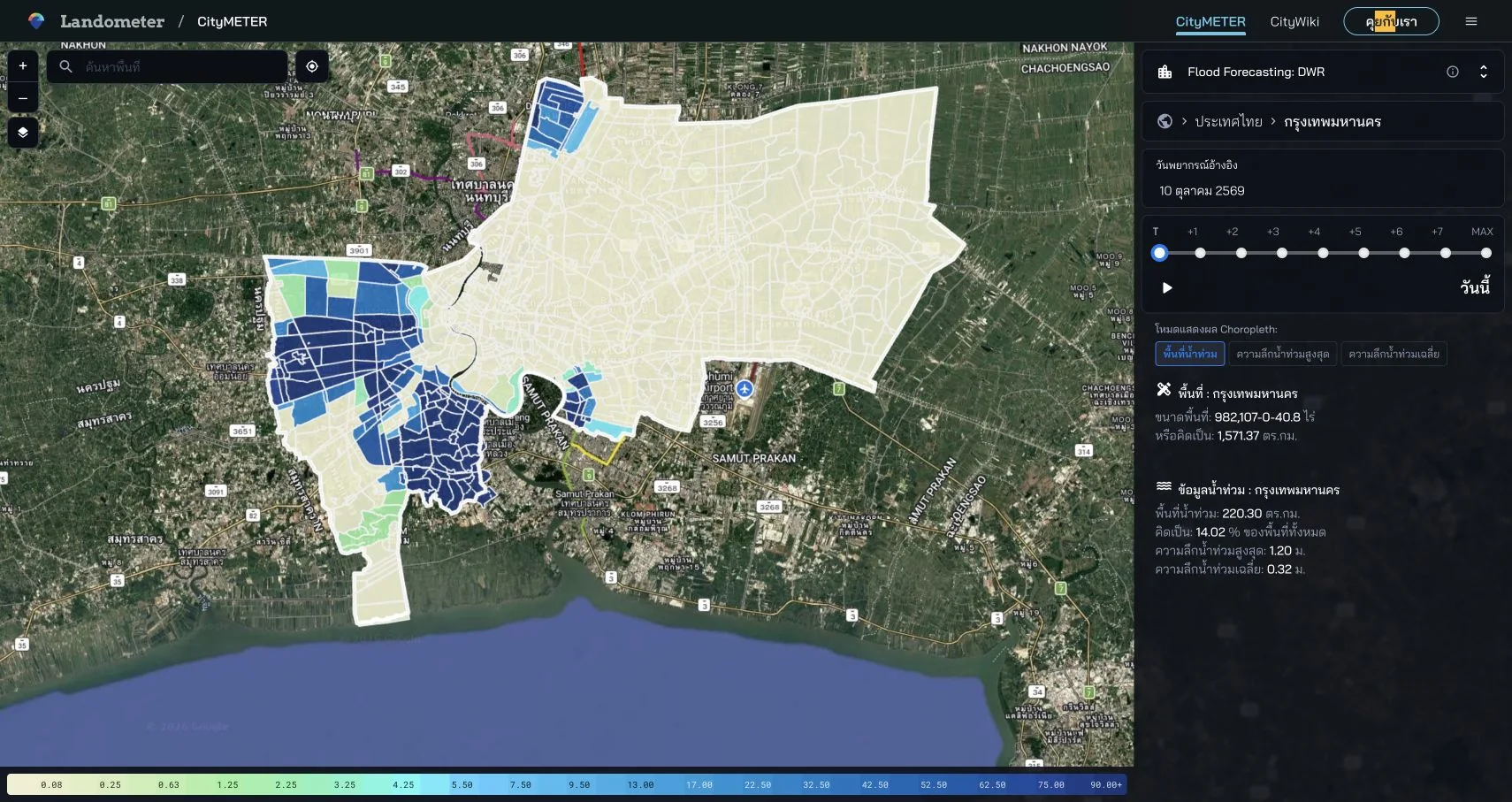
DWR model forecast · reference day 10 October 2026 · T/today mode · displayed Bangkok area: 1,571.37 km².
- Data period
- Read the details in sources
- Coverage
- Read the details in sources
- Level of detail
- Provincial forecast comparisons
- Publisher
- Department of Water Resources — forecast layer
Extent and depth describe different parts of the forecast
Modelled extent describes the size of the area shown in the forecast. Depth adds another dimension to that picture. The mean and maximum are useful together: one summarises the calculated depth, while the other indicates that a higher value occurs within the model result. For a team preparing an area review, the two measures help organise the next look at the map. The enquiry can move from the overall size of the forecast area to the locations and features that deserve a more detailed comparison.
Bring the places being managed into the enquiry
Begin with places the team manages or services it coordinates, and examine their locations in the selected day’s forecast. Record the additional questions about entrances, buildings or connecting routes. A clear list of places connects the model discussion to work that needs preparation. It also helps divide the follow-up: which question belongs with a site team, which with a local agency, and which needs another information source? The forecast becomes a shared spatial reference for that conversation, with the selected day kept beside it.
Time belongs beside every forecast value
This example refers to 10 October 2026 in T, or today, mode. On a later visit, begin with the selected date and forecast period before comparing shapes or depths. If a team keeps several forecasts for review, record the day and mode with each image. This makes the sequence understandable. A change in the display can then be discussed in relation to the particular model results being compared, and the team can identify which questions need another check during the next relevant period.
Use the forecast to prepare the next information check
Choose one area in the Bangkok result and list the additional information needed: entrance locations, levels recorded by the relevant local organisation and reports tied to the period being studied. Keep the model result and field information as separate parts of the working note. When the team returns to the discussion, it can see both the forecast and the observations collected afterwards. This provides a clear sequence for preparation and makes it easier to hand a specific question to the person or organisation best placed to answer it.
Explore your own place
Open Bangkok’s 10 October 2026 forecast and choose one area for a focused list of local information to check alongside it.
Sources and reading notesPublisher, period, coverage and references
Source details still need confirmation
- Data publisher
- Department of Water Resources forecast layer; exact public package not yet verified
- Source
- A Department of Water Resources flood-depth forecast layer. Read its model run and forecast period; the exact published source package is not yet fully identified.
- Data period
- Period not confirmed — check the reference date in the data view before use.
- Coverage
- A Thailand summary and province ranking are visible; model coverage is not stated
- Level of detail
- Province comparison is evidenced; model-surface resolution is not published
Further notes for comparison or citation
These are Department of Water Resources model outputs, not measured water levels or certain outcomes. They do not replace emergency notices.
Model output is not confirmation of an event; show run time, source, method, and limitations
Show run time, method, model and limits. A forecast is not an observation, guarantee or emergency instruction.