Living· CityMETER · Khlong Yong Town Municipality · Nakhon Pathom
Khlong Yong: three forecast rounds in one day
Flood: Flash Flood: 24-hour Risk by GoogleKhlong Yong Town Municipality appears with three forecast rounds in the previous 24 hours in the Nakhon Pathom view. Repeated signals give a service team a specific follow-up question: which local information should be checked next, and when?
This finding is based on
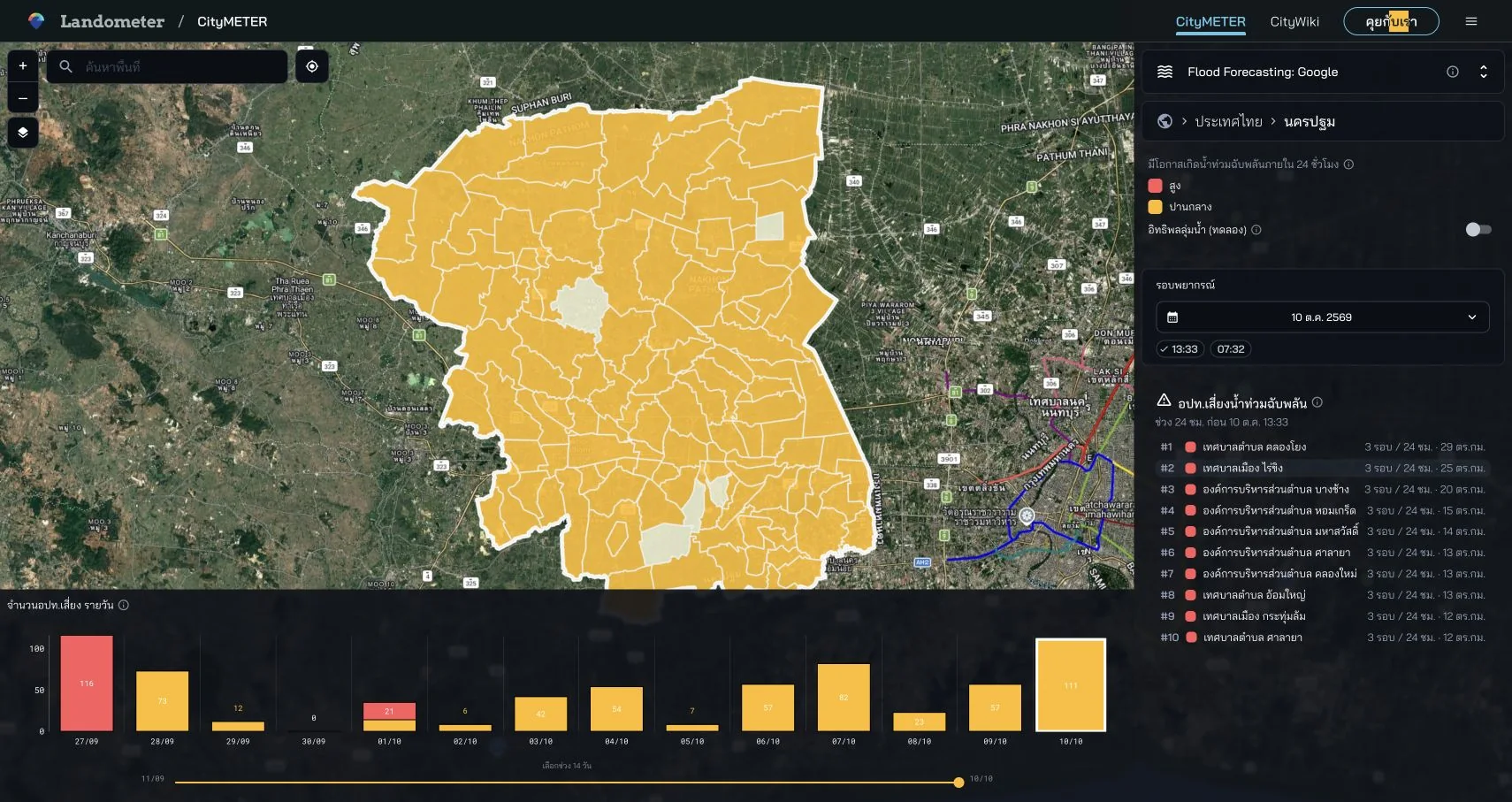
Experimental Google model · run: 10 October 2026, 13:33 · next-24-hour forecast · 29 km² is the area displayed beside the Khlong Yong entry.
- Data period
- Read the details in sources
- Coverage
- Read the details in sources
- Level of detail
- Provincial forecast comparisons
- Publisher
- Google Flood Forecasting
The round count gives the signal a time dimension
Seeing an area in one result and seeing it across several rounds create different questions. In the Khlong Yong example, the displayed count refers to forecast rounds within a 24-hour period. That gives the reader a way to examine the timing of the signal. A team can decide when to return to the next result and keep its timestamp beside information received locally. The time sequence becomes part of the enquiry, allowing colleagues to discuss the same forecast window rather than refer loosely to a map seen earlier.
A named municipality makes coordination more concrete
A named municipality gives follow-up work a concrete starting point. A service team can list the activities or places connected to Khlong Yong and identify whom to contact for additional information. Turn that into answerable questions: where is the relevant organisation’s latest report, or what time does the information about a managed site refer to? Using the same place name helps colleagues align the enquiry. The forecast entry can sit at the front of a working note, followed by the contacts and records that the team needs to consult.
Keep the run, window and unit together
The example uses the run issued on 10 October 2026 at 13:33, looking ahead 24 hours. The three-round count refers to appearances over the previous 24 hours. Keep those two time directions explicit when sharing the view. Record the municipality name and the area value shown beside its entry as well. These details make the discussion precise enough for another reader to reproduce the context. They can tell which future window the model addresses and which preceding sequence the displayed round count summarises.
Turn monitoring into an enquiry someone can continue
After reading the result, make a short note for the places connected to the team’s work. Include the issue time, the question still needing an answer and the organisation to follow up with. As information arrives, add its time and source beside it. The next visit to the forecast can then continue an existing enquiry. A colleague taking over can see what has been checked and which question remains open. This gives repeated monitoring a practical structure, connected to named places and responsibilities.
Explore your own place
Open the Khlong Yong entry, record the run time and round count, and choose one question to check against local agency information.
Sources and reading notesPublisher, period, coverage and references
Specialist source
- Data publisher
- Google Flood Forecasting
- Source
- The view identifies Google’s flood-forecasting model. Read the model name, forecast period and experimental status shown with it.
- Data period
- Period not confirmed — check the reference date in the data view before use.
- Coverage
- A Thailand summary and province ranking are visible; model coverage is not stated
- Level of detail
- Province comparison is evidenced; watershed or model-surface resolution is not published
Read the references
Further notes for comparison or citation
The model is experimental. A signal does not confirm an event or establish route safety, and it does not replace warnings.
This is a model signal, not confirmation that an event will occur; retain the experimental status
Use as a 24-hour monitoring signal with experimental status and run time—not confirmation of an event or travel advice.