Living· CityMETER · Stations 8 and 11 · RUGON network view
At the same time, two stations report different shaking levels
Earthquake Sensor NetworkIn the RUGON record dated 10 March 2026 at 10:06:33, Station 8 displays MMI 2–3 and Station 11 displays MMI 1. Reading two points at the same timestamp reveals the station-level detail available within a shaking record.
A view inside CityMETER
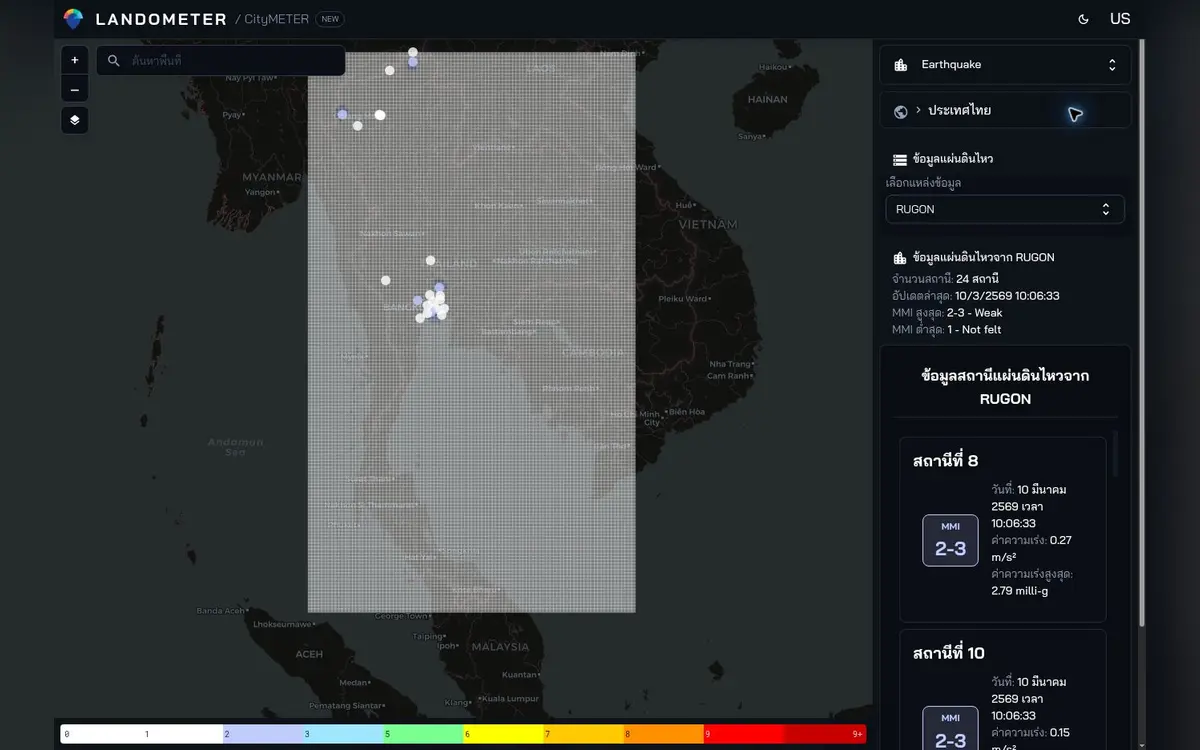
Historical RUGON record · 10 March 2026, 10:06:33 · network view displays 24 stations · MMI levels as displayed.
- Data period
- Read the details in sources
- Coverage
- Read the details in sources
- Level of detail
- Stations · readings, units and timestamps
- Publisher
- TMD · RUGON · USGS
Start with points that share a timestamp
A shaking record gains spatial meaning when each value stays attached to its station and time. Stations 8 and 11 share a timestamp in this example, making them a clear starting point for examining the displayed difference. Open each station and keep its identifier, time and measure together. Those details let another reader return to the same record. They also give a discussion a precise reference: two points in one recorded moment, rather than a general impression of an entire network or region.
The map gives the question a location
For someone following information about a place, a station value helps identify the record to examine next. Select a station relevant to the study area and note the location and period of interest. When sharing the enquiry with colleagues, keep the source name and station identifier beside the value. Everyone can then begin from the same point, and separate records remain distinguishable when several times are being read together. The map serves as a way into the evidence, while the identifier keeps the enquiry attached to an actual observation point.
Use the record to prepare the next enquiry
A building-management or area-coordination team can use the record to prepare a more focused conversation. Gather the times of interest and the locations that need explaining, then organise station records, event reports and site-specific documents as separate parts of the enquiry. Each item can address a particular question. This makes requests for further information easier to direct to the appropriate organisation or specialist. It also preserves the route from the original station value to the additional material collected, so a colleague can understand how the enquiry developed.
Leave a record that another person can revisit
When keeping an image or note, include 10:06:33 on 10 March 2026 and identify it as a historical RUGON record. Add the station identifiers and displayed MMI levels, followed by the specific question to pursue. The next reader can immediately understand the subject of the note and return to the original record before adding another source. That is the practical value of the two-station example: it turns an unfamiliar measurement into a clearly identified piece of evidence that can support a careful, continuing enquiry.
Explore your own place
Open Stations 8 and 11 in the same historical record, and keep their identifiers, timestamp and MMI levels with the next question to investigate.
Sources and reading notesPublisher, period, coverage and references
Specialist source
- Data publisher
- TMD event feed with RUGON / USGS
- Source
- Combines TMD earthquake-event information with RUGON views and USGS information. Units, timestamps and sources differ between views.
- Data period
- Period not confirmed — check the reference date in the data view before use.
- Coverage
- Geographic coverage is not stated on the public page
- Level of detail
- Station readings with location, units and data timestamps
Read the references
Further notes for comparison or citation
Older reports are not current monitoring, and station readings do not certify building safety.
Read station, units and timestamps together. Old readings are not current monitoring, and shaking measurements do not certify building safety.